
Wireless earphones travel everywhere—inside pockets, gym bags, office drawers and crowded public transport. Their soft silicone tips sit directly inside the ears, where they collect sweat, earwax, dust and skin oils. When these tips are not cleaned regularly, sound quality may become dull, the fit can feel uncomfortable and unpleasant odour may develop.
Cleaning earphone tips is simple, but careless methods can push moisture into the speaker mesh or damage the silicone. The safest routine is to remove the tips, wash them separately and allow every part to dry completely before reassembly.
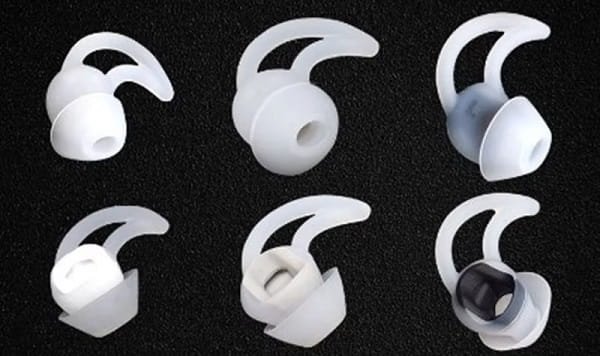
Remove the Silicone Tips Carefully
Start by switching off the earphones and placing them on a clean, dry surface. Hold the body of one earbud firmly, then gently pull the silicone tip away from the sound nozzle.
Do not pull from one thin edge because this may stretch or tear the material. Grip the thicker base and use a slow twisting motion if the tip feels tight.
Remove both tips and keep track of their sizes. Many earphones use different-sized tips, and placing the wrong size on an earbud can affect comfort and noise isolation.
Prepare a Mild Cleaning Solution
Fill a small bowl with lukewarm water and add one or two drops of mild liquid soap. Strong detergents, bleach, hand sanitiser and household cleaners should be avoided because they may weaken the silicone or leave irritating residue.
Place only the removable silicone tips in the solution. Never soak the earbuds, charging case or sound nozzles.
Allow the tips to sit for a few minutes. This helps soften dried earwax and oily buildup without requiring aggressive scrubbing.
Wash the Tips Gently
Rub each tip between clean fingers while it remains in the soapy water. Turn the silicone inside out carefully to clean the inner surface.
For stubborn dirt, use a soft cotton swab or a clean, soft-bristled toothbrush. Apply very light pressure and focus on the edges and central opening.
Avoid using pins, needles or sharp tools. These may puncture the silicone, change its shape or leave scratches where dirt can collect more easily.
Rinse the tips thoroughly under clean lukewarm water until no soap remains. Soap residue can make the tips slippery and may irritate sensitive ears.
Dry Them Completely
Shake off excess water and place the tips on a clean microfiber cloth or paper towel. Pat the outer surfaces gently, then leave them in a ventilated area until they are fully dry.
Do not attach damp tips to the earphones. Moisture can travel through the nozzle and damage the speaker mesh or internal electronics.
Avoid drying them with a hair dryer, heater or direct sunlight. Excessive heat may deform the silicone and affect the fit. Air drying is slower but much safer.
Clean the Earbuds Without Soaking Them
While the tips are drying, inspect the earbud nozzles. Use a dry, soft brush to remove loose dust or wax from the speaker mesh.
Hold the earbud with the mesh facing downward while brushing. This encourages debris to fall away instead of being pushed deeper inside.
For the outer plastic surface, use a slightly damp microfiber cloth and wipe gently. Keep liquid away from openings, microphones and charging contacts. Even water-resistant earphones should not be treated as waterproof cleaning devices.
Reattach the Tips Correctly
Once the silicone tips are completely dry, align each one with the earbud nozzle and press it into place. Check that the base sits evenly and does not come off when pulled lightly.
An incorrectly fitted tip can remain inside the ear when the earbud is removed. It may also reduce bass and outside-noise isolation.
Test the earphones at a low volume after reassembly. If one side sounds quieter, check whether the mesh is blocked or the tip has been attached incorrectly.
Build a Regular Cleaning Routine
Clean the tips every one or two weeks during normal use. More frequent cleaning may be needed after workouts, outdoor travel or use in hot weather.
Wipe the earbuds after sweating and avoid sharing them with other people. Store them only after they are dry, and clean the charging case separately with a dry cloth or soft brush.
Replace silicone tips when they become loose, torn, permanently discoloured or unable to hold their original shape.
FAQs
Q: Can silicone earphone tips be cleaned with alcohol?
A: Occasional light wiping may be suitable for some products, but frequent alcohol use can dry or weaken certain materials. Mild soap and water are safer for removable silicone tips.
Q: Can I put earphone tips back while they are slightly wet?
A: No. Allow them to dry completely because trapped moisture can reach the speaker mesh and damage the earphones.
Q: Why do my earphones sound quieter after cleaning?
A: The tips may be fitted incorrectly, or moisture may still be present near the nozzle. Remove them, allow more drying time and inspect the mesh without using sharp objects.
Q: How often should silicone ear tips be replaced?
A: Replace them when they become torn, stretched, uncomfortable or difficult to clean. Heavy users may need replacements sooner than occasional listeners.
 Prateema Jain